
 3x-ui
WeChat Notifications
Receive event alerts and scheduled reports through a WeCom group robot or a compatible WeChat webhook gateway.
WeChat is an independent, optional text-notification channel. It supports event alerts and scheduled status reports, with its own language, event selection, and CPU/memory thresholds. Existing notification channels retain their settings. WeChat notifications are disabled by default.
WeCom mode sends to an enterprise group robot. Personal WeChat requires a separately deployed bridge that implements the custom gateway protocol and has its own working WeChat connection. The panel does not include that bridge or provide a direct personal WeChat bot login.
Setup
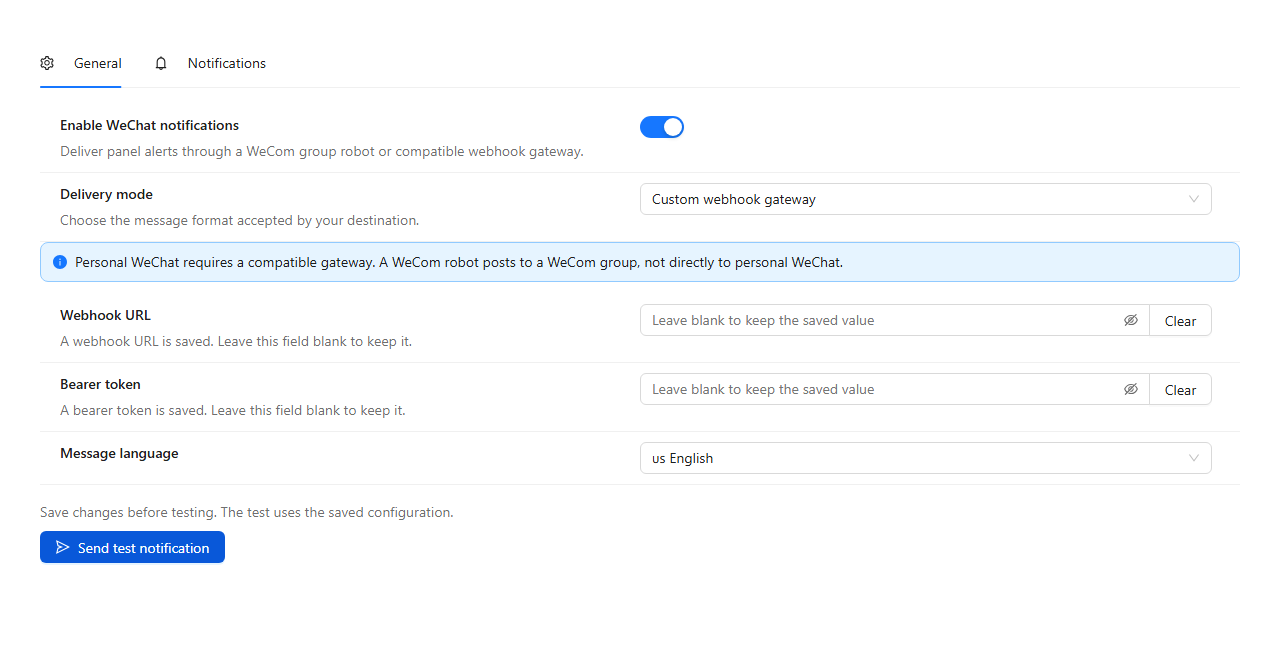
- Open Panel Settings → WeChat and enable notifications.
- Choose a delivery mode:
- WeCom group robot: add a message-push robot to your enterprise WeChat group and paste its HTTPS webhook URL. See the official configuration guide.
- Custom webhook gateway: enter your HTTPS receiver URL and, optionally, a Bearer token that the receiver verifies. A compatible gateway delivers messages to personal WeChat. This uses the protocol below; an arbitrary third-party push URL or a WeChat contact name is not a receiver.
- Select the notification language. It is independent of the Telegram bot language.
- Under Notifications, choose events and thresholds. A metric threshold of
0disables that metric's alerts. - Optionally enable scheduled reports and choose a cron schedule.
@dailyuses the panel scheduler's time zone. - Save, then click Send test notification. The test uses saved settings and is disabled while the channel is off or any settings have unsaved changes.
URLs can contain robot credentials, so both the URL and token are redacted when settings are loaded. Leaving a secret blank retains its saved value; Clear followed by Save removes it. Disable the channel before clearing a required destination. Saving also updates report schedules and metric sampling without restarting the panel.
Alerts and reports
Event keys are login.attempt, cpu.high, memory.high, xray.crash, node.down, node.up, outbound.down, and outbound.up. The initial selection is login attempts and high CPU usage. Login notifications include the attempted username, client IP, outcome, and available failure reason, but not the password.
Repeated alerts for one event and source are limited to one successful send per minute. Failed and successful login outcomes have separate limits. A failed delivery does not consume the successful-send cooldown.
Reports summarize the host, panel and Xray versions, CPU, memory, disk, uptime, and inbound/client counts, including disabled, expired, and depleted entries. Reports also run when Xray is stopped. This channel has no remote commands or file-backup feature, and does not include subscription links or client configuration files in reports.
Traffic totals cover client statistics managed by this panel, deduplicated by client email. Used traffic is upload plus download. Remaining traffic sums each client's non-negative quota balance; when a runtime quota is unset, the client's configured quota is used. If there are no client statistics or any client has no configured quota, the remaining total reads Quota not configured. These values do not represent a VPS provider's billing allowance or traffic outside 3x-ui.
Custom gateway protocol, version 1
The panel sends an HTTPS POST with Content-Type: application/json and, when configured, Authorization: Bearer <your-token>:
{
  "version": 1,
  "id": "8f793626-a0e0-4a28-bddf-84c077a1bd21",
  "type": "event",
  "event": "cpu.high",
  "hostname": "my-server",
  "occurred_at": "2026-11-04T12:00:00Z",
  "text": "3x-ui · my-server\nHigh CPU usage: 92.00%; threshold: 80%"
}
type is event, report, or test. For events, event is a selected event key; reports and tests use report and test. occurred_at preserves the event's occurrence time, falling back to send time only when no event time is available. text is plain UTF-8 text, at most 20,480 bytes.
The receiver should verify authentication and version, durably enqueue with a uniqueness constraint on id, and return 2xx after accepting responsibility for delivery. This acknowledges the gateway's receipt, not necessarily delivery to the final WeChat user. The receiver handles final delivery and further retries.
Connection failures and 5xx receive at most one retry with the same ID and body. Other rejected responses are not retried. Deduplicate by ID to handle lost acknowledgements. Each request has a 10-second timeout, responses are limited to 4 KiB, and redirects are refused. This contract has no dependency on a particular gateway service.
WeCom and network requirements
WeCom mode requires the official https://qyapi.weixin.qq.com/cgi-bin/webhook/send?key=... endpoint and a successful errcode: 0 response. Long text is split at UTF-8 boundaries into at most ten messages of 2,048 bytes, spaced at least 3.1 seconds apart. Requests are not automatically retried because the robot API has no ID-based deduplication for this channel.
Both modes use direct outbound HTTPS with certificate verification, independent of the panel outbound proxy. Custom receivers must resolve to public addresses. Private, loopback, link-local, and metadata-service addresses are blocked again at connection time. Provide a public HTTPS receiver when the final WeChat adapter runs on a private network.